Hardware → Expansion Devices
Expansion devices are connected through the main unit's expansion connector (the G2 bus), and are accessed through the G2 interface.
Expansion devices respond on the G2 bus synchronous cycle. Because the modem uses an asynchronous cycle, the expansion device must not respond.
Area Assignments
Expansion devices are normally assigned to 1K areas (refer to the table below) in what is normally a 16K space that starts from the 16-bit address 0x0000. The address assignment is based on the state of the expansion device's SELx pins.
Table 4-11
Expansion devices can use the address spaces shown below.
*It is recommended that 0x03000000 through 0x03FFFFFF be the image for 0x01000000 to 0x01FFFFFF.
Table 4-12
The 1K spaces have a 32-byte basic register set that is common to the expansion devices, and which functions as configuration registers that are set when using expansion device interrupts or an area that exceeds 1K.
When requesting an area that is greater than 1K in size, the configuration register is used by the software for resource management in order to assign the area. In addition, because it is not possible to guarantee that an expansion device will occupy a fixed area (occupying specific addresses is prohibited), the software must by configured so that no problems arise no matter which area is allocated to an expansion device.
All expansion devices share one interrupt. In addition, the three G2-DMA transfer requests are used by all expansion devices on an exclusive basis.
Configuration Registers
The configuration registers occupy a 32-byte area at the beginning of the 1K area that is the basic space for expansion devices. The contents of these registers are described below. A reset resets each register to "0."
*Access (read only) to 0x0004 through 0x000E differs for each device.
Table 4-13
○ 0x0000 to 0x0002: ID0-1 G2 identifier
This identifier is used to determine whether the rest of the registers that follow are the correct registers.
The sequence of bytes, starting from 0x0000, is "G", "A", "P", and "S". (temporary)
bit31-24 (0x0002_bit15-8): 0x53
bit23-16 (0x0002_bit7-0): 0x4D
bit15-8 (0x0000_bit15-8) : 0x41
bit7-0 (0x0000_bit7-0): 0x47
○ 0x0004 to 0x0008: ID2 to 4 Individual identifier
This area can be used in any fashion desired.
○ 0x000A: ID5 Device Categoly
This indicates the general category of the device. Each bit indicates a function category. If the device has multiple functions, each of the corresponding bits is set to "1".
bit15 : G2 bus bridge/repeater
bit14 : -
bit13 : Extra Bus Bridge (PCMCIA, ISA, etc.)
bit12-7 : -
bit6 : Miscellaneous I/O (Keyboard, MOUSE, etc.)
bit5 : LAN/Ethernet
bit4 : SCSI
bit3 : ATA/IDE/compact-FLASH
bit2 : parallel (IEEE1284-1994)
bit1 : serial/Modem/ISDN (165x0)
bit0 : Memory (DRAM/DRAM)
○ 0x000C: ID6 Serial number
This is a product code that identifies the device.
This register consists of the manufacturer's code (8 bits) and a serial number (8 bits); the serial number is managed by the manufacturer. The manufacturer's code 0x00 and the serial number 0x00 can be used as a prototype code. The serial number correspondence is shown below.
“ 0xXXYY “
bit15-8 : maker code ;XX
bit7-0 : serial number ;YY
XX-- = 0x00-- : Standard device (internal specifications are public)
XXYY = 0x0000 : Prototype
XXYY = 0x0001 : DRAM interface
XXYY = 0x0002 : Simple ISA interface
XXYY = 0x0003 : G2 bus buffer
XXYY = 0x0004 : Simple IDE interface
XX-- = 0x01-- : Sega
XXYY = 0x0100 : Sega prototype
○ 0x000E: ID7 Compatible Number
This register is specified when the device indicated by the serial number is the same, or is upward compatible, and the control software can be used as is. If there is no compatible device, this register is 0x0000.
bit15-8 : maker code
bit7-0 : serial number
○ 0x0010: Reg0 Address Space 0
Set this register when an area larger than the basic 1K space is required. Specify addresses in units of 64K x 2[n] bytes. When 0x0000 is specified, device allocation is prohibited.
If the address space is not required, this register can be treated as a read-only register that returns 0x0000.
bits 15-13 : N.A.
bits 12-0 : Correspond to A28 through 16 of a CPU address
○ 0x0012: Reg1 Address Space 1
Address 0x0012 has the same function as address 0x0010; 0x0010 and 0x0012 can be used to allocate two different address spaces. Specify addresses and areas in units of 64K x 2[n] bytes.
If the address space is not required, this register can be treated as a read-only register that returns 0x0000.
This register is used when an area larger than the standard 1K space is required.。
bits15-13 : N.A.
bits12-0 : Correspond to A28 through 16 of a CPU address
○ 0x0014: Reg2 DMA Transfer Request Assign
This register is used to select signal lines for outputting a transfer request to G2-DMA. When a bit is set to "1," the corresponding signal line is driven. If G2-DMA is not being used, this register can be treated as a read-only register that returns 0x0000.
bits15-4 : N.A.
bits3 : DMA Request Signal Select (G2RQDEVN)
0- Signal High-Z
1- Active
bits2 : DMA Request Signal Select (G2RQEX2N)
0- Signal High-Z
1- Active
bit1 : DMA Request Signal Select (G2RQEX1N)
0- Signal High-Z
1- Active
bit0 : N.A.
○ 0x0016: Reg3 Device Enable Reg
This register is used to enable a device and the area allocated by 0x0010 and 0x0012. Bit 1 permits "1" to be read from read/write registers.
The 1K area that is standard can always be enabled.
bits15-2 : N.A.
bit1 : Device Register Mask
0- Mask Off
1- Mask On
bit0 : Device Enable
0- Dis
1- Enable
○ 0x0018 — 0x001A: Reg4 — Reg5 Interrupt Mask
These mask registers control the output of interrupts when interrupts are generated. These registers can control up to 32 sources; when a bit is set to "1," the corresponding interrupt output is enabled. If interrupt are not being used, this register can be treated as a read-only register that returns 0x00000000.
These registers are packed, starting from the lowest bit.
bits 31-0 (0x001A_bit15-0, 0x0018_bit15-0)
○ 0x001C — 0x001E: Reg6 — Reg7 Interrupt Status
These registers reflect the status of interrupts that have been generated by the device. When a bit is "1," the corresponding interrupt is being generated. These registers are used in conjunction with the interrupt mask registers; when the bits that correspond to an interrupt output are both "1," that interrupt output is low. When there are multiple interrupt sources, one or more interrupts are generated, and the interrupt outputs go low if the corresponding mask bits are set to "1."
Depending on the device, it may also be possible to clear an interrupt by writing a "1" to the corresponding bit in this register. (In some cases, interrupts may be cleared by accessing a different register.)
bits 31-0 (0x001E_bit15-0, 0x001C_bit15-0)
The 32 bytes from 0x0000 to 0x001F described above comprise the configuration registers.
○ The area from 0x0020 to 0x3FF is used by each device.
Device Detection (Example)
When the device that exists in address 0x00620000 supports the bridge function, device detection is performed for the remaining areas as well. In this case, because expansion devices are not necessarily located in consecutive areas, detection must be performed for all areas.
If the device does not support the bridge function, only one device is connected, so device detection is not performed for any other area.
(a) The detection start address is set as 0x00620000.
(b) Read the address + 0x0000 and + 0x0002.
・ If the G2 identifier is found, a device is detected. →©
・ If the values that were read differ, no device is detected. →(z)
・ If a timeout occurs, no device is detected. →(z)
© Read the address + 0x00C.
・ If the value is 0x0000, handling is unknown (a prototype). →(g)
・ If the value is not 0x0000, search for the device driver. →(d)
(d) Search for the device driver.
・ If the driver is found, initialize the device accordingly. →(g)
・ If the device driver is not found, read the address + 0x000E. →(e)
(e) Read the address + 0x000E.
・ If the value is 0x0000, handling is unknown. →(g)
・ If the value is not 0x0000, search for the device driver. →(f)
(f) Search for the device driver.
・ If the driver is found, initialize the device accordingly. →(g)
・ If the device driver is not found, handling is unknown. →(g)
(g) If the detected address is 0x00620000...
・ End if the device does not support the bus bridge function(when + 0x00A_bit15 is "0"). →(z)
・ Search for the bridge destination if the device does support the bus bridge function. →(h)
・ If the detected address is not 0x00620000… →(h)
(h) Repeat steps (b) through (f) 15 times, once for each 1K, starting from 0x00620400.
(z) End
<<Device initialization processing (Example)>>
(a) Write 0x0002 in the address + 0x0016, so that "1" can be read from the bits corresponding to the registers that can be set.
(b) Read the address + 0x0010, + 0x0012, + 0x0014, + 0x0014, + 0x0018, and + 0x001A.
© Write 0x0000 in the address + 0x0016 to return to normal operation.
(d) Any value that was read in (b) that was not 0x0000 indicates a resource request that was being made, so allocate resources accordingly.
(e) Write to the address + 0x0010, + 0x0012, + 0x0014, + 0x0014, + 0x0018, and + 0x001A, as necessary.
(f) Write 0x0002 in the address + 0x0016, enabling the device.
<<G2 bus and expansion devices>>
The G2 bus is designed for about three devices to be connected, including a sound source IC and a modem, and the drive capabilities of the signal lines that are output from the main unit are limited. As a result, it is not possible to connect multiple external devices. If multiple external devices are connected, the signal lines must be buffered.
When connecting multiple devices by means of an expansion box, etc., connect them through a device that has a repeater or bridge function. The connection diagrams below illustrate the connection of one expansion device and the connection of an expansion box.
[Connection between main unit and one expansion device]
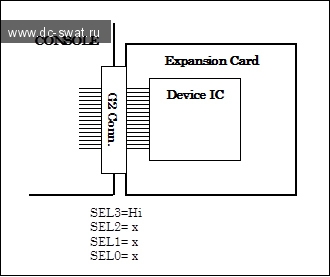
Fig. 4-4
[Connection between main unit and an expansion box]
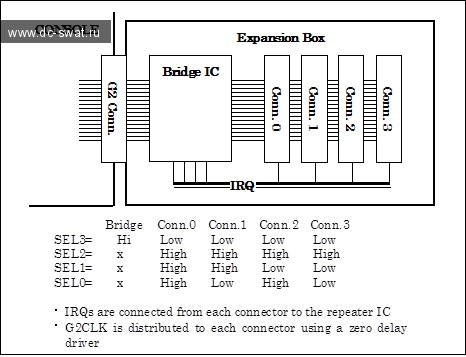
Fig. 4-5
Expansion devices respond on the G2 bus synchronous cycle. Because the modem uses an asynchronous cycle, the expansion device must not respond.
Area Assignments
Expansion devices are normally assigned to 1K areas (refer to the table below) in what is normally a 16K space that starts from the 16-bit address 0x0000. The address assignment is based on the state of the expansion device's SELx pins.
| area | address range | SH4 address |
| 0 | 0x0000 — 0x03FF | 0x00620000 — 0x006203FF |
| 1 | 0x0400 — 0x07FF | 0x00620400 — 0x006207FF |
| 2 | 0x0800 — 0x0BFF | 0x00620800 — 0x00620BFF |
| 3 | 0x0C00 — 0x0FFF | 0x00620C00 — 0x00620FFF |
| 4 | 0x1000 — 0x13FF | 0x00621000 — 0x006213FF |
| 5 | 0x1400 — 0x17FF | 0x00621400 — 0x006217FF |
| 6 | 0x1800 — 0x1BFF | 0x00621800 — 0x00621BFF |
| 7 | 0x1C00 — 0x1FFF | 0x00621C00 — 0x00621FFF |
| 8 | 0x2000 — 0x23FF | 0x00622000 — 0x006223FF |
| 9 | 0x2400 — 0x27FF | 0x00622400 — 0x006227FF |
| 10 | 0x2800 — 0x2BFF | 0x00622800 — 0x00622BFF |
| 11 | 0x2C00 — 0x2FFF | 0x00622C00 — 0x00622FFF |
| 12 | 0x3000 — 0x33FF | 0x00623000 — 0x006233FF |
| 13 | 0x3400 — 0x37FF | 0x00623400 — 0x006237FF |
| 14 | 0x3800 — 0x3BFF | 0x00623800 — 0x00623BFF |
| 15 | 0x3C00 — 0x3FFF | 0x00623C00 — 0x00623FFF |
Table 4-11
Expansion devices can use the address spaces shown below.
| ADDRESS | SIZE | AREA |
| 0x00620000~0x0062FFFF | 64KByte | Synchronous cycle 16-bit address area |
| 0x01000000~0x01FFFFFF | 16MByte | Synchronous cycle 32-bit address area |
| 0x03000000~0x03FFFFFF | 16MByte | Synchronous cycle 32-bit address area |
| 0x14000000~0x17FFFFFF | 64MByte | Synchronous cycle 32-bit address area |
*It is recommended that 0x03000000 through 0x03FFFFFF be the image for 0x01000000 to 0x01FFFFFF.
Table 4-12
The 1K spaces have a 32-byte basic register set that is common to the expansion devices, and which functions as configuration registers that are set when using expansion device interrupts or an area that exceeds 1K.
When requesting an area that is greater than 1K in size, the configuration register is used by the software for resource management in order to assign the area. In addition, because it is not possible to guarantee that an expansion device will occupy a fixed area (occupying specific addresses is prohibited), the software must by configured so that no problems arise no matter which area is allocated to an expansion device.
All expansion devices share one interrupt. In addition, the three G2-DMA transfer requests are used by all expansion devices on an exclusive basis.
Configuration Registers
The configuration registers occupy a 32-byte area at the beginning of the 1K area that is the basic space for expansion devices. The contents of these registers are described below. A reset resets each register to "0."
| Offset Address | Access | Contents |
| 0x0000 | R/- | ID0: G2 identifier low |
| 0x0002 | R/- | ID1: G2 identifier high |
| 0x0004 | R/- | ID2: Individual identifier |
| 0x0006 | R/- | ID3: Individual identifier |
| 0x0008 | R/- | ID4: Individual identifier |
| 0x000A | R/- | ID5: Device Category |
| 0x000C | R/- | ID6: Serial Number |
| 0x000E | R/- | ID7: Comaptible Number |
| 0x0010 | R/W | Reg0: Address Space 0 |
| 0x0012 | R/W | Reg1: Address Space 1 |
| 0x0014 | R/W | Reg2: DMA Transfer Request Assign |
| 0x0016 | R/W | Reg3: Device Enable Register |
| 0x0018 | R/W | Reg4: Interrupt Mask Low |
| 0x001A | R/W | Reg5: Interrupt Mask High |
| 0x001C | R/W | Reg6: Interrupt Status Low |
| 0x001E | R/W | Reg7: Interrupt Status High |
*Access (read only) to 0x0004 through 0x000E differs for each device.
Table 4-13
○ 0x0000 to 0x0002: ID0-1 G2 identifier
This identifier is used to determine whether the rest of the registers that follow are the correct registers.
The sequence of bytes, starting from 0x0000, is "G", "A", "P", and "S". (temporary)
bit31-24 (0x0002_bit15-8): 0x53
bit23-16 (0x0002_bit7-0): 0x4D
bit15-8 (0x0000_bit15-8) : 0x41
bit7-0 (0x0000_bit7-0): 0x47
○ 0x0004 to 0x0008: ID2 to 4 Individual identifier
This area can be used in any fashion desired.
○ 0x000A: ID5 Device Categoly
This indicates the general category of the device. Each bit indicates a function category. If the device has multiple functions, each of the corresponding bits is set to "1".
bit15 : G2 bus bridge/repeater
bit14 : -
bit13 : Extra Bus Bridge (PCMCIA, ISA, etc.)
bit12-7 : -
bit6 : Miscellaneous I/O (Keyboard, MOUSE, etc.)
bit5 : LAN/Ethernet
bit4 : SCSI
bit3 : ATA/IDE/compact-FLASH
bit2 : parallel (IEEE1284-1994)
bit1 : serial/Modem/ISDN (165x0)
bit0 : Memory (DRAM/DRAM)
○ 0x000C: ID6 Serial number
This is a product code that identifies the device.
This register consists of the manufacturer's code (8 bits) and a serial number (8 bits); the serial number is managed by the manufacturer. The manufacturer's code 0x00 and the serial number 0x00 can be used as a prototype code. The serial number correspondence is shown below.
“ 0xXXYY “
bit15-8 : maker code ;XX
bit7-0 : serial number ;YY
XX-- = 0x00-- : Standard device (internal specifications are public)
XXYY = 0x0000 : Prototype
XXYY = 0x0001 : DRAM interface
XXYY = 0x0002 : Simple ISA interface
XXYY = 0x0003 : G2 bus buffer
XXYY = 0x0004 : Simple IDE interface
XX-- = 0x01-- : Sega
XXYY = 0x0100 : Sega prototype
○ 0x000E: ID7 Compatible Number
This register is specified when the device indicated by the serial number is the same, or is upward compatible, and the control software can be used as is. If there is no compatible device, this register is 0x0000.
bit15-8 : maker code
bit7-0 : serial number
○ 0x0010: Reg0 Address Space 0
Set this register when an area larger than the basic 1K space is required. Specify addresses in units of 64K x 2[n] bytes. When 0x0000 is specified, device allocation is prohibited.
If the address space is not required, this register can be treated as a read-only register that returns 0x0000.
bits 15-13 : N.A.
bits 12-0 : Correspond to A28 through 16 of a CPU address
○ 0x0012: Reg1 Address Space 1
Address 0x0012 has the same function as address 0x0010; 0x0010 and 0x0012 can be used to allocate two different address spaces. Specify addresses and areas in units of 64K x 2[n] bytes.
If the address space is not required, this register can be treated as a read-only register that returns 0x0000.
This register is used when an area larger than the standard 1K space is required.。
bits15-13 : N.A.
bits12-0 : Correspond to A28 through 16 of a CPU address
○ 0x0014: Reg2 DMA Transfer Request Assign
This register is used to select signal lines for outputting a transfer request to G2-DMA. When a bit is set to "1," the corresponding signal line is driven. If G2-DMA is not being used, this register can be treated as a read-only register that returns 0x0000.
bits15-4 : N.A.
bits3 : DMA Request Signal Select (G2RQDEVN)
0- Signal High-Z
1- Active
bits2 : DMA Request Signal Select (G2RQEX2N)
0- Signal High-Z
1- Active
bit1 : DMA Request Signal Select (G2RQEX1N)
0- Signal High-Z
1- Active
bit0 : N.A.
○ 0x0016: Reg3 Device Enable Reg
This register is used to enable a device and the area allocated by 0x0010 and 0x0012. Bit 1 permits "1" to be read from read/write registers.
The 1K area that is standard can always be enabled.
bits15-2 : N.A.
bit1 : Device Register Mask
0- Mask Off
1- Mask On
bit0 : Device Enable
0- Dis
1- Enable
○ 0x0018 — 0x001A: Reg4 — Reg5 Interrupt Mask
These mask registers control the output of interrupts when interrupts are generated. These registers can control up to 32 sources; when a bit is set to "1," the corresponding interrupt output is enabled. If interrupt are not being used, this register can be treated as a read-only register that returns 0x00000000.
These registers are packed, starting from the lowest bit.
bits 31-0 (0x001A_bit15-0, 0x0018_bit15-0)
○ 0x001C — 0x001E: Reg6 — Reg7 Interrupt Status
These registers reflect the status of interrupts that have been generated by the device. When a bit is "1," the corresponding interrupt is being generated. These registers are used in conjunction with the interrupt mask registers; when the bits that correspond to an interrupt output are both "1," that interrupt output is low. When there are multiple interrupt sources, one or more interrupts are generated, and the interrupt outputs go low if the corresponding mask bits are set to "1."
Depending on the device, it may also be possible to clear an interrupt by writing a "1" to the corresponding bit in this register. (In some cases, interrupts may be cleared by accessing a different register.)
bits 31-0 (0x001E_bit15-0, 0x001C_bit15-0)
The 32 bytes from 0x0000 to 0x001F described above comprise the configuration registers.
○ The area from 0x0020 to 0x3FF is used by each device.
Device Detection (Example)
When the device that exists in address 0x00620000 supports the bridge function, device detection is performed for the remaining areas as well. In this case, because expansion devices are not necessarily located in consecutive areas, detection must be performed for all areas.
If the device does not support the bridge function, only one device is connected, so device detection is not performed for any other area.
(a) The detection start address is set as 0x00620000.
(b) Read the address + 0x0000 and + 0x0002.
・ If the G2 identifier is found, a device is detected. →©
・ If the values that were read differ, no device is detected. →(z)
・ If a timeout occurs, no device is detected. →(z)
© Read the address + 0x00C.
・ If the value is 0x0000, handling is unknown (a prototype). →(g)
・ If the value is not 0x0000, search for the device driver. →(d)
(d) Search for the device driver.
・ If the driver is found, initialize the device accordingly. →(g)
・ If the device driver is not found, read the address + 0x000E. →(e)
(e) Read the address + 0x000E.
・ If the value is 0x0000, handling is unknown. →(g)
・ If the value is not 0x0000, search for the device driver. →(f)
(f) Search for the device driver.
・ If the driver is found, initialize the device accordingly. →(g)
・ If the device driver is not found, handling is unknown. →(g)
(g) If the detected address is 0x00620000...
・ End if the device does not support the bus bridge function(when + 0x00A_bit15 is "0"). →(z)
・ Search for the bridge destination if the device does support the bus bridge function. →(h)
・ If the detected address is not 0x00620000… →(h)
(h) Repeat steps (b) through (f) 15 times, once for each 1K, starting from 0x00620400.
(z) End
<<Device initialization processing (Example)>>
(a) Write 0x0002 in the address + 0x0016, so that "1" can be read from the bits corresponding to the registers that can be set.
(b) Read the address + 0x0010, + 0x0012, + 0x0014, + 0x0014, + 0x0018, and + 0x001A.
© Write 0x0000 in the address + 0x0016 to return to normal operation.
(d) Any value that was read in (b) that was not 0x0000 indicates a resource request that was being made, so allocate resources accordingly.
(e) Write to the address + 0x0010, + 0x0012, + 0x0014, + 0x0014, + 0x0018, and + 0x001A, as necessary.
(f) Write 0x0002 in the address + 0x0016, enabling the device.
<<G2 bus and expansion devices>>
The G2 bus is designed for about three devices to be connected, including a sound source IC and a modem, and the drive capabilities of the signal lines that are output from the main unit are limited. As a result, it is not possible to connect multiple external devices. If multiple external devices are connected, the signal lines must be buffered.
When connecting multiple devices by means of an expansion box, etc., connect them through a device that has a repeater or bridge function. The connection diagrams below illustrate the connection of one expansion device and the connection of an expansion box.
[Connection between main unit and one expansion device]
Fig. 4-4
[Connection between main unit and an expansion box]
Fig. 4-5
- 0
- SWAT
- 01 декабря 2010, 08:37
Комментарии (0)
rss свернуть / развернуть